

As a laser and optics engineer, you often need to quickly determine the beam characteristics in an optical system without performing complex calculations. Fortunately, OpticStudio provides a paraxial Gaussian beam analysis tool, a calculator tool that enables quick computation of both ideal and mixed-mode (M² > 1) Gaussian beam properties as the beam propagates through your optical system.
This interactive tool computes and displays essential beam data, such as beam size, beam divergence, and waist locations, surface by surface, allowing for a simplified design and analysis workflow.
What is the Paraxial Gaussian Beam Analysis Tool?
The paraxial Gaussian beam analysis tool in OpticStudio is designed to simulate and display the propagation of a Gaussian beam through an optical system. You can input the initial beam properties (such as beam waist size and M² value), and the tool will propagate the beam through the system, updating key beam characteristics at each surface.
This tool can simulate both ideal Gaussian beams (with M² = 1) and real-world beams (with M² > 1), which is particularly useful for assessing the performance of laser systems in practical applications.
Key Features of the Paraxial Gaussian Beam Calculator
Input Parameters:
Wavelength: Enter the wavelength of the laser beam (e.g., 632.8 nm for He-Ne lasers).
Beam Waist Size: Define the radius of the beam waist at the laser output.
M² Value: Set the beam quality (M²), which quantifies the deviation from the ideal Gaussian beam (M² = 1).
Waist Location: Specify the distance from the laser source to the beam waist.
Propagation:
The tool computes how the beam size, divergence, and waist location evolve as the beam propagates through each optical surface in the system.Visualization:
The 1D Universal Plot shows the Gaussian beam size as a function of the image plane location, helping you visualize the beam waist and focal point.
Example: Designing a Focusing System for a He-Ne Laser
Let’s walk through an example, referencing the system parameters from the article “Designing a He-Ne Laser Focusing System in OpticStudio“. Let’s recap the system parameters.
- Nominal Wavelength = 632.8 nm
- Measured 5 mm from laser output:
- Beam diameter = 0.48 mm
- Measured divergence = 1.7 mrad
Knowing the wavelength and the far field divergence angle, the beam waist is calculated to be 0.118 mm, with a Rayleigh range of 69.7 mm. We will model this system using Paraxial Gaussian beam analysis tool so that the beam spot is the smallest at 30 mm away from the laser output.
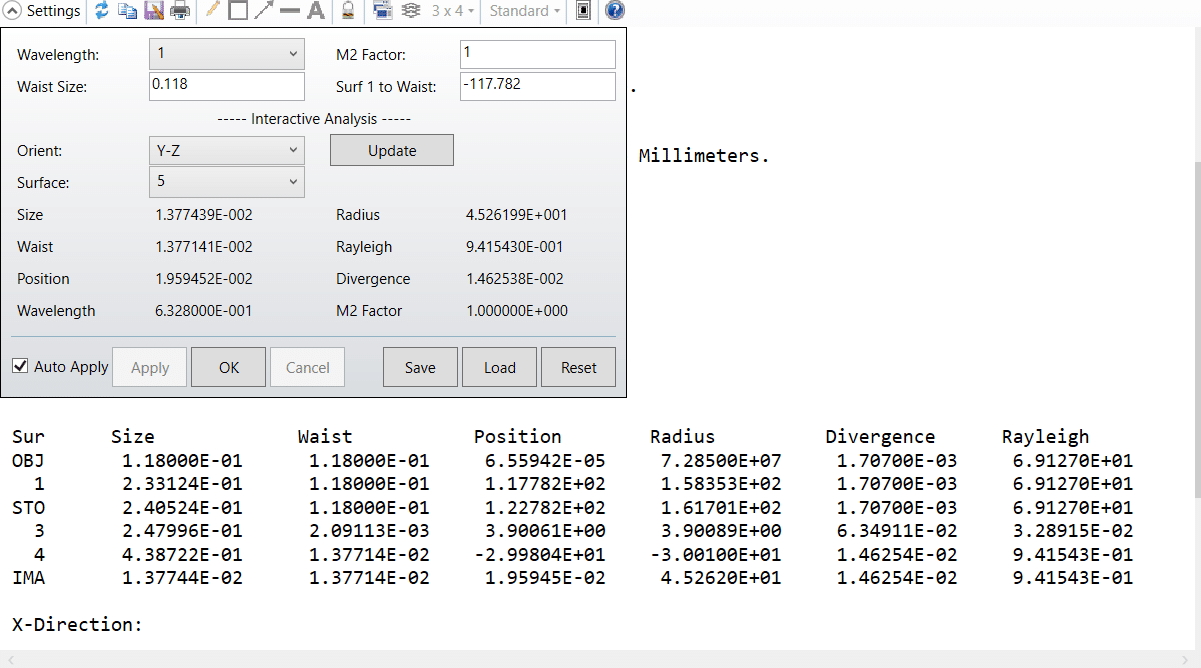
The system design and layout is as below:


Here, we’ll look at the Paraxial Gaussian Beam results using 1D Universal Plot to validate the result. This plot shows the computed paraxial Gaussian beam size as a function of the image plane location.

In the plot, you can see the smallest Gaussian beam size 0.014 occurs at a back focal distance around 30 mm, which turns out to be very close to waist size 0.0137mm in the paraxial Gaussian beam calculator. The limitation is that the calculation of Gaussian beam parameters is based upon paraxial ray data, therefore the results may not be accurate for systems which have large aberrations, or those cannot be described by paraxial optics, such as non-rotationally symmetric systems. This feature also ignores all apertures, and assumes the Gaussian beam propagates well within the apertures of all the lenses in the system.
- The input embedded beam is defined by its Wavelength, Waist Size (radius), and waist location, which is specified using the distance between the beam waist location and surface 1 in the system.
- M2 Factor. The ideal M2 value is unity, but real lasers will always have an M2 value greater than unity.
Reference
- https://www.zemax.com/
- The design file used in this article is attached. How to computes Gaussian beam characteristics with a “calculator”